当你用 uv tool install --from git+URL 从 Git 仓库安装 Python CLI 工具时,uv tool list --outdated 命令会按包的内部名称去 PyPI 查询,而不是去查 Git 源。如果 PyPI 上存在同名的不同包,uv 就会报告一个虚假的更新。修复方法是解析 --show-version-specifiers 的输出来识别 Git 源,然后直接查询 GitHub Releases。
我正在写一个能同时更新 Homebrew、pnpm 全局包和 uv 全局包的脚本。Homebrew 没问题。pnpm 没问题。uv 却报告一个根本不存在的大版本更新。以下是发生了什么、为什么会发生、以及如何正确处理。
要点
uv tool list --outdated按包名查询 PyPI,而不是原始 Git 源- 如果 PyPI 上存在同名但不同的包(名称冲突),你会得到误报
- 同样的问题影响
uv tool upgrade --all,可能失败或更新到错误的包- 解决方案:解析
--show-version-specifiers输出识别 Git 源,然后直接查询 GitHub Releases API- 使用
uv tool install --from git+...@<tag> --force更新 Git 源工具
问题的发现过程
我在写 devflow-update—— 一个 fish shell 脚本,一次性检查 Homebrew、pnpm 和 uv 中哪些包过期了。Homebrew 和 pnpm 都有内置的子命令:
brew outdated
pnpm outdated -g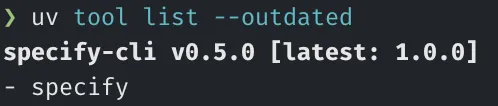
uv 对应的命令是 uv tool list --outdated。脚本解析输出、比较版本、展示结果。一切正常,直到我看到了这个:
specify-cli v0.5.0 [latest: 1.0.0]从 0.5.0 到 1.0.0,一个大版本更新。specify-cli 是 GitHub spec-kit 的 CLI 工具。我去查 Release Notes 准备升级,发现仓库的 Release 页面上根本没有 1.0.0。最新版本还在 0.x 的范围里。
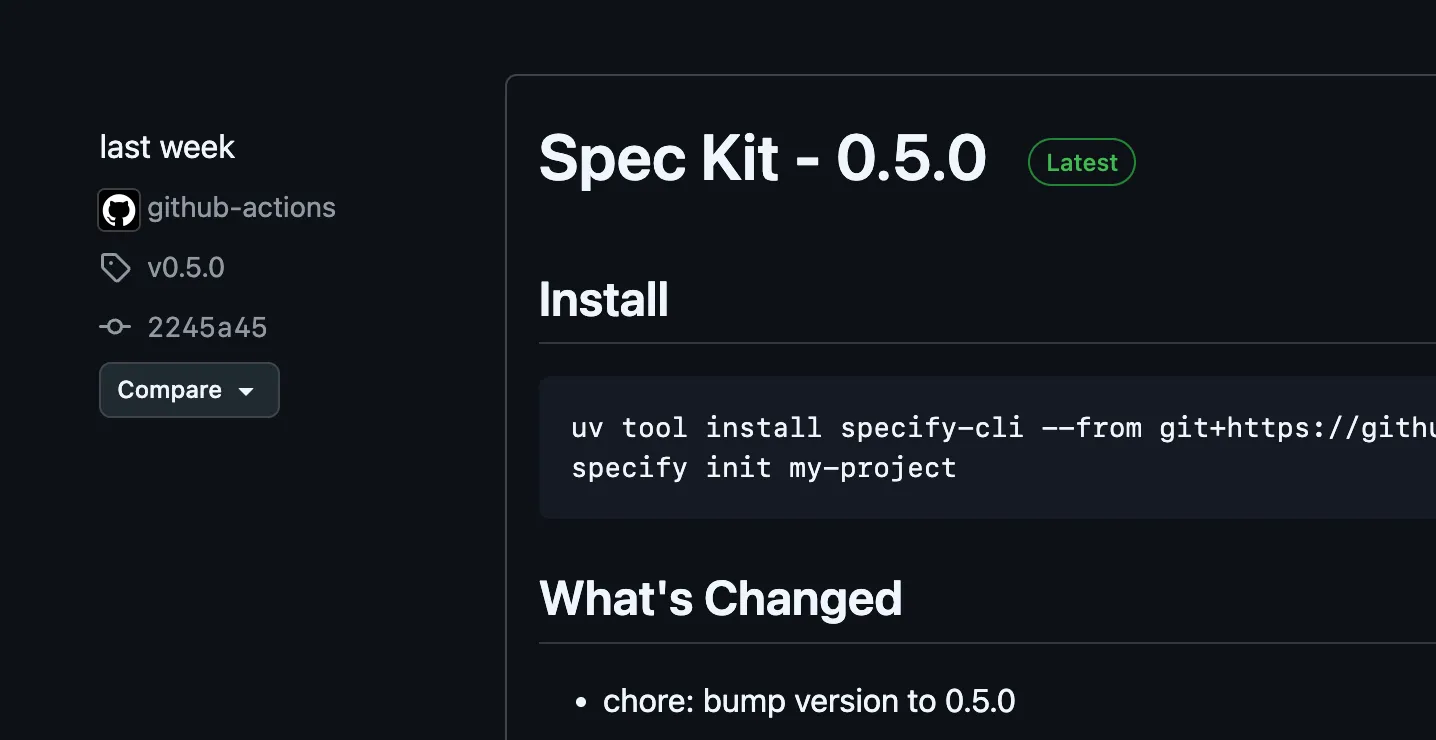
这时候我注意到这个包是通过 Git 安装的:
uv tool install specify-cli --from git+https://github.com/github/spec-kit.git我去 PyPI 搜了 specify-cli,发现一个完全不同、毫无关联的包版本号是 1.0.0。不同的作者,不同的项目,相同的名字。一次活生生的包名碰撞。
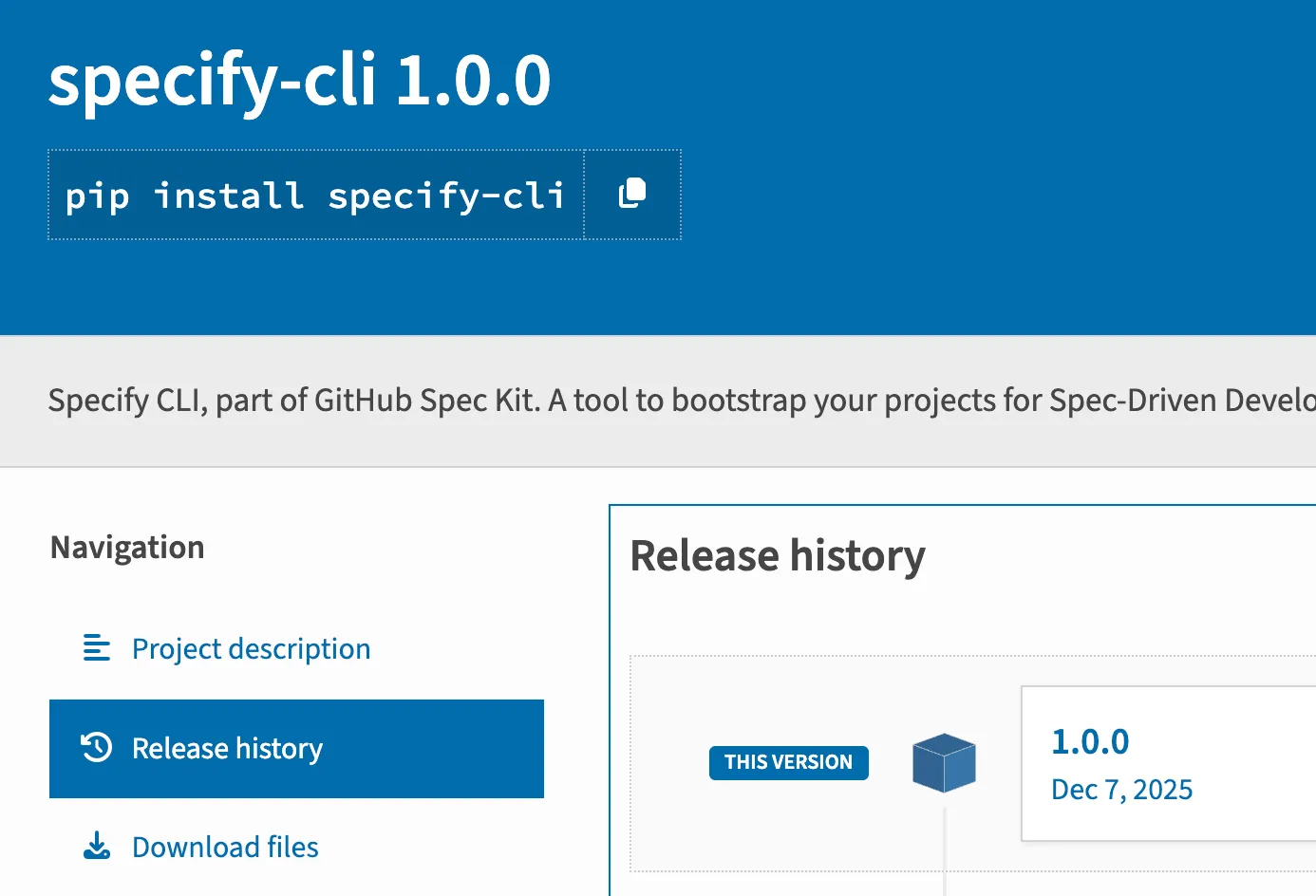
uv tool list --outdated 的默认行为是拿本地包名去 PyPI 索引查询。因为 1.0.0 在语义化版本上确实大于 0.5.0,uv 产生了误报。如果我盲目执行了 uv tool upgrade --all,它会把我的 spec-kit 替换成一个完全不同的 PyPI 包。
为什么 uv tool list —outdated 会搞错
默认行为:按包名查询 PyPI
当你运行 uv tool list --outdated 时,uv 遍历已安装的工具,提取每个包的内部名称(pyproject.toml 或 setup.py 中的名称),然后查询 PyPI JSON API 获取该名称的最新版本。再用 semver 比对 PyPI 版本和本地版本。
对于从 PyPI 直接安装的工具,这套逻辑完美运行。你机器上的 httpie 对应 PyPI 上的 httpie,版本一一对应,没有歧义。
Git 安装的工具会怎样
从 Git 仓库安装时,用于查询的包名仍然是仓库打包元数据中定义的内部名称,而不是 Git URL。两个完全无关的包可以共享同一个内部名称。
在我的案例中:
- 我的工具:
specify-cliv0.5.0,从git+https://github.com/github/spec-kit.git安装 - PyPI 上的包:
specify-cliv1.0.0,不同作者的不同项目
uv 看到 “specify-cli”,问 PyPI “specify-cli 的最新版本是什么?” PyPI 回答 “1.0.0”。uv 比较 1.0.0 > 0.5.0,报告有更新。但这个更新在源仓库中根本不存在。这只是一个” 幽灵更新”。
两种失败模式:误报 vs 未找到
这个问题根据 PyPI 上是否存在同名包,有两种表现形式:
误报(我遇到的情况):PyPI 上有一个同名但不同的包,版本号更高。uv tool list --outdated 报告了一个在 Git 源中不存在的升级。执行 uv tool upgrade 可能会把你的工具替换成错误的包。
“未找到” 错误:PyPI 上根本没有这个名字的包。这在 GitHub issue #8926 中有记录,当 Git 安装的包在 PyPI 上没有对应项时,uv pip list --outdated 会报错。
两种模式都是错的。工具是从 Git 安装的,版本检查应该针对 Git 源,而不是 PyPI。截至 uv 0.6.x,没有内置参数可以改变这个行为。你必须自己绕过它。
检测碰撞:—show-version-specifiers
可靠检查的关键是在进行版本比较之前,先识别安装来源。uv 提供了一个参数:
uv tool list --show-version-specifiers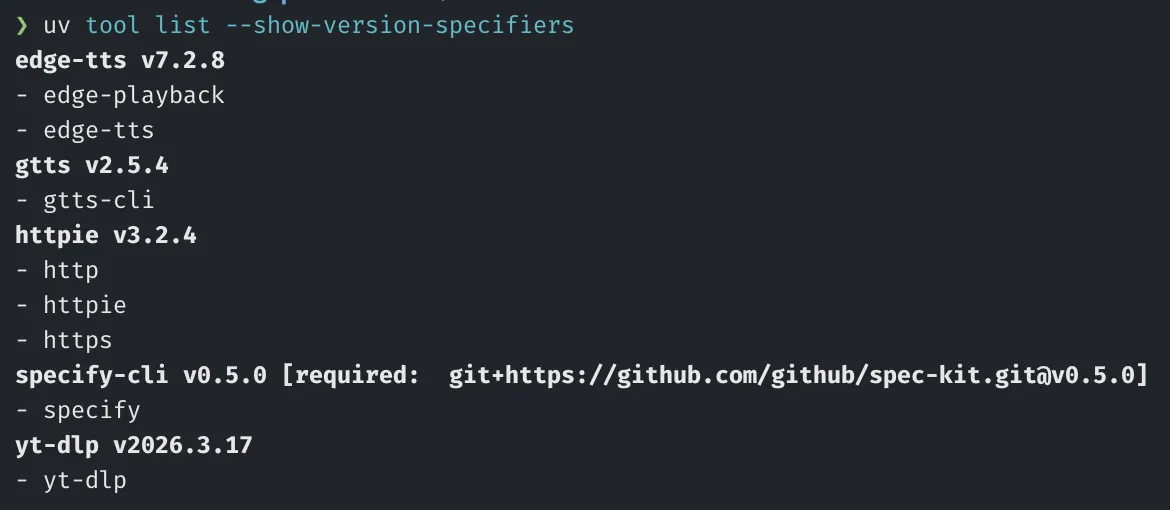
输出类似这样:
httpie v4.0.0 [required: httpie>=4.0.0]
specify-cli v0.5.0 [required: git+https://github.com/github/spec-kit.git]
ruff v0.11.0 [required: ruff>=0.11.0]
从 PyPI 安装的工具显示标准版本说明符(httpie>=4.0.0)。从 Git 安装的工具显示带 git+ 前缀的完整 URL(git+https://github.com/github/spec-kit.git)。这个区别让你可以将更新策略分为两条路径。
解析逻辑很直接。在 fish shell 中:
for line in (uv tool list --show-version-specifiers 2>/dev/null)
  # 匹配 Git 源工具
  set -l git_match (string match -r -- '^(\S+)\s+v(\S+)\s+\[required:\s+git\+(.+)\]$' $line)
  if test (count $git_match) -ge 4
    # $git_match[2] = 名称, $git_match[3] = 版本, $git_match[4] = git URL
    # 使用 GitHub Releases API 检查版本
    continue
  end
  # 匹配 PyPI 源工具
  set -l pypi_match (string match -r -- '^(\S+)\s+v(\S+)$' $line)
  if test (count $pypi_match) -ge 3
    # $pypi_match[2] = 名称, $pypi_match[3] = 版本
    # 使用 uv tool list --outdated 检查版本
  end
end
这样 PyPI 工具走 uv tool list --outdated 的正常路径,Git 工具走独立的代码路径,直接查询源仓库。
正确检查 Git 安装工具的方法
识别出 Git 源工具后,检查更新需要三步。以下方案假设仓库托管在 GitHub 上,这涵盖了绝大多数通过 Git 安装的 Python 工具。
第一步:解析仓库地址
从 --show-version-specifiers 记录的 Git URL 中提取 GitHub 的 owner 和 repo 名称。URL 格式通常是 https://github.com/<owner>/<repo>.git,去掉前缀和后缀即可:
set -l repo_match (string match -r -- 'https://github.com/([^/]+)/([^/]+?)(?:\.git)?$' $url)
# $repo_match[2] = owner, $repo_match[3] = repo
第二步:查询 GitHub Releases API
拿到 owner 和 repo 后,获取最新 Release:
set -l release (curl -s "https://api.github.com/repos/$owner/$repo/releases/latest")
set -l latest_tag (echo "$release" | jq -r '.tag_name // empty')
注意:GitHub API 匿名请求限制为每小时 60 次。如果 Git 安装的工具很多或检查频率高,需要配置 Personal Access Token(PAT),限额提升到每小时 5,000 次:
set -l release (curl -s -H "Authorization: token $GITHUB_TOKEN" \
  "https://api.github.com/repos/$owner/$repo/releases/latest")
第三步:比较版本
去掉 v 前缀后比较:
set -l current_ver (string replace -r '^v' '' $installed_version)
set -l latest_ver (string replace -r '^v' '' $latest_tag)

if test "$current_ver" != "$latest_ver"
  echo "$name has update: $current_ver -> $latest_tag"
end
更新 Git 安装的工具
同样的 PyPI 查询问题也影响更新流程。uv tool upgrade --all 升级 PyPI 源工具时能正确工作,但对 Git 源工具处理不正确。它可能静默失败,或者尝试从 PyPI 拉取而不是 Git 源,这在 GitHub issue #18522 中有记录。
正确的方法是使用 --force 从 Git 源重新安装到新 tag:
uv tool install --from git+https://github.com/<owner>/<repo>.git@<tag> --force <package-name>例如:
uv tool install --from git+https://github.com/github/spec-kit.git@v0.5.0 --force specify-cli--force 是必需的,因为工具已经安装。不加的话 uv 会跳过安装,认为不需要变更。@<tag> 后缀将安装固定到特定 Release,而不是默认分支的 HEAD—— 这正是你想要的:可复现的、受版本控制的更新。
pipx 是怎么处理的
作为对比,pipx 会追踪每个工具的原始安装来源。运行 pipx upgrade 时,pipx 检查安装时记录的来源。从 Git 安装就去查 Git,从 PyPI 安装就去查 PyPI。不需要绕过方案,直接就能用。
这是 uv 应该有的行为,GitHub issue #8244 追踪了”uv 作为 pipx 替代品” 的更广泛功能请求,包括更好的 Git 源处理。
uv 完胜 pipx 的核心优势:速度。uv 用 Rust 编写,大多数操作比 pipx 快 10-100 倍。依赖解析更好,缓存更激进,工具隔离更干净。对于 PyPI 源工具,uv 严格更优。
pipx 仍然领先的地方:Git 安装工具的来源追踪。pipx 记住你从哪里安装的并检查那个来源。uv 安装后忘记来源,回退到 PyPI 进行版本检查。在 uv 添加正式的来源追踪之前,本文的绕过方案是必要的。
| 特性 | uv | pipx |
|---|---|---|
| PyPI 安装速度 | 快(Rust) | 慢(Python/pip) |
| Git 来源追踪 | 无(回退到 PyPI) | 有 |
Git 工具 --outdated | 误报 | 正确 |
| 依赖解析 | 更优 | 基础 |
Git 工具 upgrade --all | 有问题 | 正常工作 |
实际结论:把 uv 作为默认工具管理器。95% 的场景下它更快更好。对于少数 Git 安装的工具,应用本文的分离策略绕过方案。
总结
uv tool list --outdated 对 Git 仓库安装的工具不可靠,因为它按包名查询 PyPI 而不是原始安装源。当存在名称冲突(PyPI 上有同名但不同的包)时,你会得到误报。当 PyPI 上不存在同名包时,你会得到错误。
修复方法很直接:解析 --show-version-specifiers 识别 Git 源工具,将它们从 --outdated 输出中过滤掉,然后直接查询 GitHub Releases API。更新时使用 uv tool install --from git+URL@tag --force 而不是 uv tool upgrade --all。
这种分离策略 ——PyPI 工具走 uv 内置机制,Git 工具走 GitHub API—— 让你在两种来源下都能获得准确的版本检查和正确的更新。
完整的更新脚本
完整实现在我 Agentic-TUI 仓库中:
- 检查脚本:devflow-update.fish — 分类工具、通过对应渠道检查过期、展示结果
- 升级脚本:devflow-upgrade.fish — 使用分离策略执行升级
升级脚本的 uv 部分做四件事:
- 分类工具:解析
--show-version-specifiers,分为 Git 源和 PyPI 源 - 过滤 PyPI 过期:运行
--outdated,从结果中排除 Git 源工具名 - 检查 Git 过期:对每个 Git 工具,提取 GitHub URL,调用 Releases API,比较 tag
- 执行升级:PyPI 工具批量
uv tool upgrade --all;Git 工具逐个uv tool install --from git+URL@tag --force
常见问题
为什么 uv tool list —outdated 对 Git 工具显示错误版本?
uv 将包名(来自仓库的 pyproject.toml 或 setup.py)解析到 PyPI 索引。它不会追踪原始 Git 源 URL 来做版本检查。如果 PyPI 上存在同名的不同包且版本号更高,uv 就会报告虚假更新。
如何更新从 GitHub 仓库安装的 uv 工具?
使用带特定 tag 的 --force 重装方式:uv tool install --from git+https://github.com/owner/repo.git@v1.2.3 --force package-name。@v1.2.3 后缀固定版本,--force 覆盖已有安装。
uv 计划修复这个名称冲突问题吗?
目前没有确认的时间表。uv GitHub 仓库中有几个相关的开放 issue(#8926、#18522、#8244),但截至 2026 年 4 月都未解决。本文描述的绕过方案是目前的推荐做法。
全局 CLI 工具应该用 uv 还是 pipx?
对于 PyPI 源工具,uv 严格更好:更快、依赖解析更强、隔离更干净。对于 Git 源工具,pipx 有更好的来源追踪。如果你大部分工具从 PyPI 安装,用 uv 并对少数 Git 源工具应用分离策略绕过方案即可。